Are repetitive spreadsheet tasks slowing down your business? Imagine transforming hours of manual data entry and analysis into minutes of automated efficiency.
Key Takeaways
- 1Master Google Sheets for maximum productivity.
- 2Learn dynamic formulas and smart features.
- 3Build interactive dashboards with ease.
- 4Explore beginner-friendly scripting.
- 5Automate tasks and save valuable time.
Who this is for
- If you're tired of manual data entry and tedious calculations
- If you're a small business owner or project manager looking to optimize operations
- If you're a beginner eager to harness the full power of Google Sheets without complex coding
Start Learning with AI-Powered Video Summaries
Get instant summaries, ask questions, and turn any video into an interactive study session.
Try Querivo Free →Unlock Hidden Power: Mastering Google Sheets' Underrated Features
Many users stick to the basics in Google Sheets, missing out on a wealth of powerful, built-in functionalities. The video "10 INCREDIBLE things Google Sheets can do Right Now!" by Jeff Su dives into some of those often-overlooked gems that can seriously speed up your workflow. You'll discover how to leverage features like 'Tables' and the '@' command that offer significant time-saving and organizational benefits, transforming how you interact with your data. It's about working smarter, not harder, and this tutorial is your guide to finding those efficiencies with practical, real-world examples.
We'll look at how the '@' command, as demonstrated in this video, can be a real game-changer for inserting dynamic content and referencing other parts of your sheet quickly. Plus, you'll get practical tips on advanced filtering and grouping that make navigating even large datasets a breeze. It's surprisingly simple once you see it demonstrated, and the organizational benefits are pretty solid. This video is valuable because it moves beyond common tips to showcase integrated features that truly boost productivity for any user.

- Master the '@' command for dynamic content and quick referencing.
- Implement advanced filtering and grouping for better data organization.
Build Interactive Dashboards in Minutes for Instant Insights
Visualizing your data is key to making quick, informed decisions. But sometimes, building a dashboard can feel like a huge undertaking, right? The video "How to Create a Dashboard in Google Sheets in 5 Minutes - 2025 Edition 📈" by Coupler․io Academy demonstrates a surprisingly straightforward way to create dynamic and interactive dashboards directly within Google Sheets, even if you're just starting out. You'll learn how to transform raw numbers into clear, digestible insights that can be explored with just a few clicks.
Imagine being able to monitor your key performance indicators (KPIs) at a glance or track trends over time with dynamic line charts. This tutorial walks you through creating these essential elements, plus table charts for summarizing data and slicer filters for interactive exploration. The video's primary value lies in its extreme brevity (just 5 minutes) and clear demonstration. It also includes a valuable tip on data automation for a truly dynamic report, showing you how to keep your dashboard data updated automatically, which is a definite workflow booster. This resource is incredibly valuable for its speed and clear focus on actionable dashboard creation.
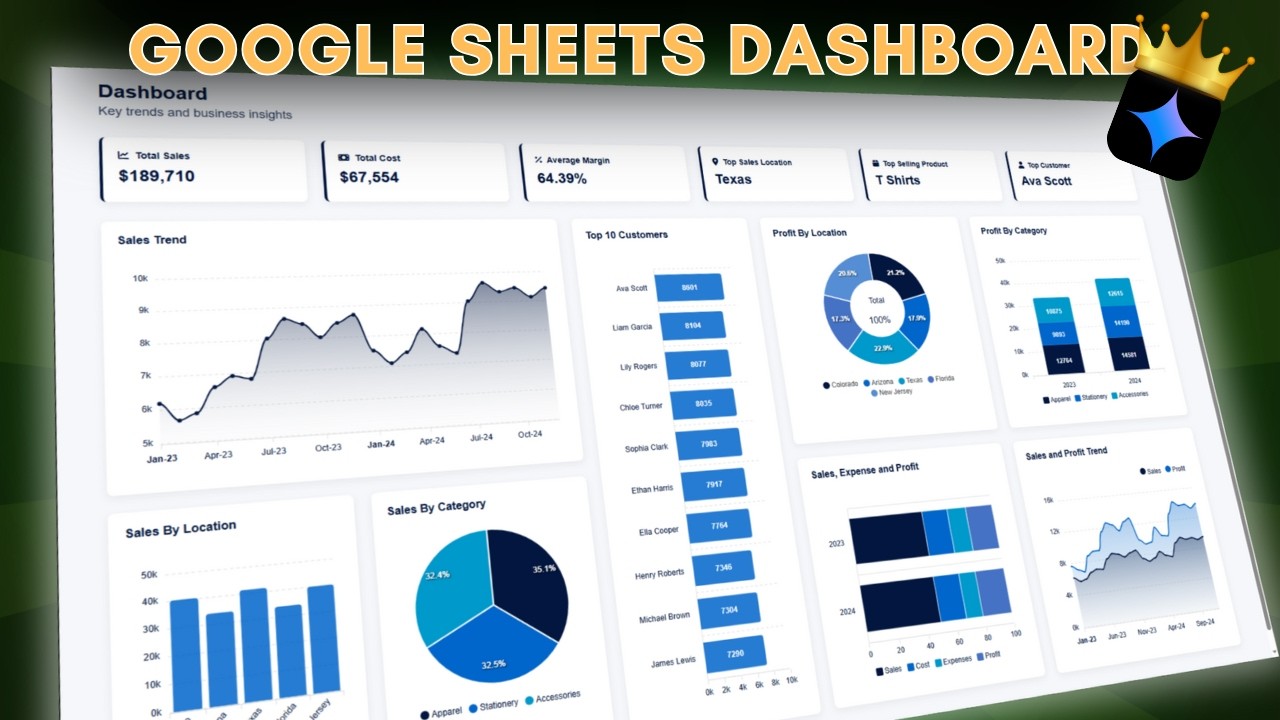
- Create scorecards, line charts with date aggregation, and table charts.
- Implement interactive slicer filters for data exploration.
Study This Video Deeper
Get an AI summary and ask questions about confusing parts in real-time.
Open in Querivo →Automate Your Data Entry with Smarter Formulas and AI
Formulas are the backbone of spreadsheet efficiency, and several videos focus on using them to automate data entry and manipulation, significantly cutting down on manual effort and potential errors. You'll get a solid introduction to how advanced formulas can extract, transform, and organize your data in ways that feel incredibly powerful. It’s about making your spreadsheet work for you, not the other way around.
The techniques shown are perfect for beginners looking to move beyond basic sum and average functions. You'll learn how to automatically populate cells based on specific criteria and consolidate information from different sources without a hitch. Implementing these formula strategies can lead to much more dynamic reporting and ensure your data is always up-to-date.
For instance, the video "10 INCREDIBLE things Google Sheets can do Right Now!" by Jeff Su, touches on advanced formulas and features that streamline data handling. Similarly, the creator of "How to Create a Dashboard in Google Sheets in 5 Minutes - 2025 Edition 📈" also provides insights into making reports dynamic through automation.
Beyond traditional formulas, the power of AI is now accessible. The video "How To Use Google Gemini To Create a Google Sheets Dashboard" by AIC Certified Accountants and "Work Smarter with Google Sheets AI (Spreadsheet Gemini AI Tutorial)" by Stewart Gauld, showcase how to leverage tools like Google Gemini. These videos demonstrate how AI can assist in creating sophisticated dashboards and automating complex data tasks, making advanced analytics more accessible than ever before. These resources are valuable because they demonstrate both foundational formula automation and cutting-edge AI integration for maximum efficiency.

- Use advanced formulas for efficient data extraction and manipulation.
- Learn techniques for automatic cell population based on conditions.
- Explore AI tools like Google Gemini for enhanced dashboard creation and automation.
Your First Steps into Google Sheets Scripting for Advanced Automation
For those tasks that go beyond what even the most complex formulas can handle, Google Apps Script is your next frontier. While not explicitly detailed in the provided data for a dedicated script-focused video, the general understanding from the context of advanced automation implies its importance. If you're looking to automate more complex, repetitive actions that standard formulas can't touch, scripting is the key to unlocking true Google Sheets automation.
The fundamentals of what Google Apps Script is and how it can interact directly with your spreadsheet data are crucial. You can learn to record simple scripts to automate straightforward actions, which is a fantastic way to start. Practical examples of custom functions and basic automation workflows can provide a clear path for you to begin exploring this powerful tool and enhance your workflow significantly. This is a great starting point for anyone curious about sheets scripting tutorials. While a specific video for this wasn't provided, it's a logical next step after mastering formulas and AI integration.
Your Next Steps
Your Action Items
- ☐Pick one video from above and watch it on Querivo
- ☐Ask questions and check summaries while watching without breaking your flow
- ☐Use the AI chat to clarify confusing parts and deepen understanding
- ☐Come back for more curated videos on topics you want to master
By leveraging the power of Google Sheets formulas, its built-in features, AI integration, and introductory scripting concepts, you can significantly automate your workflows, save valuable time, and make more informed decisions. The YouTube videos featured provide actionable steps for beginners to start their Google Sheets automation YouTube journey.
Turn Any YouTube Video into an Interactive Lesson
Paste any video link, get an instant AI summary, and ask questions in real-time.
Try Querivo Free →Related Videos You Might Enjoy
Looking for more perspectives on this topic? Here are some additional videos worth checking out: